
Ansible File creation playbook
Write a playbook that creates a file on every managed node with the file module, then target only the webservers group and learn why state touch is not idempotent.
Imagine an important file has to exist on a hundred servers: a marker file, an empty log, a placeholder config. You could SSH into each server and run touch. Or you could write five lines of YAML once and let Ansible do it on all hundred at the same time. This lesson does the second.
The file module
So far we used the ping and shell modules. To manage files and directories, Ansible has the file module (full name ansible.builtin.file). It can create, delete and change permissions of files, directories and links, depending on its state:
state | What it does |
|---|---|
touch | Creates an empty file if it does not exist. If it exists, updates its access and modification time (like the Linux touch command) |
file | Only checks or changes properties (owner, mode) of an existing file. It does not create a missing file |
directory | Creates a directory, including any missing parent directories |
absent | Deletes the file, or the directory with everything inside it |
link / hard | Creates a symbolic or hard link |
Write the playbook
On the control node, switch to the ansible user. You land in its home directory, where first-playbook.yml already lives:
sudo su - ansible
ls -l
vi file-creation.yml---
- hosts: all
tasks:
- name: file creation
file:
path: /home/ansible/alien.txt
state: touch
...| Line | Meaning |
|---|---|
hosts: all | Run on every managed node in the inventory. We have two now, it could be a hundred |
name: file creation | Label printed in the output |
file: | Use the file module (ansible.builtin.file) |
path: | Full path of the file on the managed node. /home/ansible is the home directory of the ansible user we created on every node |
state: touch | Create the file if it is missing |
No become here: Ansible logs in as ansible, and that user owns /home/ansible, so no root rights are needed.
Check the syntax:
ansible-playbook file-creation.yml --syntax-checkProve the file is not there yet
Before running anything, connect to both managed nodes in separate terminals and look:
sudo su - ansible
ls -l
total 0Empty on both. Now we know any file that appears was created by Ansible.
Run it
Back on the control node:
ansible-playbook file-creation.ymlTASK [file creation] ***********************************************************
changed: [172.31.9.250]
changed: [172.31.12.18]
PLAY RECAP *********************************************************************
172.31.12.18 : ok=2 changed=1 unreachable=0 failed=0 skipped=0 rescued=0 ignored=0
172.31.9.250 : ok=2 changed=1 unreachable=0 failed=0 skipped=0 rescued=0 ignored=0changed=1 on both hosts: one new thing was created. On the managed nodes:
ls -l-rw-rw-r--. 1 ansible ansible 0 Jun 19 05:51 alien.txtA zero-byte file owned by ansible, on both machines, from one command.
Target only the web servers
Now change the playbook so it runs only on the webservers group and creates a different file:
---
- hosts: webservers
  tasks:
    - name: file creation
      file:
        path: /home/ansible/telusko.txt
        state: touch
...
Before running it, ask Ansible which hosts it would touch:
ansible-playbook file-creation.yml --list-hostsplaybook: file-creation.yml
play #1 (webservers): webservers TAGS: []
pattern: ['webservers']
hosts (1):
172.31.9.250It is --list-hosts
In the lecture the first attempt is --host-list, which fails with "unrecognized arguments". The correct flag is --list-hosts. When you forget a flag, ansible-playbook --help lists them all.
Run it:
ansible-playbook file-creation.ymlOnly 172.31.9.250 appears in the output. On managed-node-1 (webservers) you now see alien.txt and telusko.txt. On managed-node-2 (dbservers) there is still only alien.txt. The group in hosts: decides where the work happens.
Run it again: idempotence and the touch trap
Most modules are idempotent: they check the current state first and only change something if it differs from what you asked for. Running the same playbook ten times gives the same result as running it once.
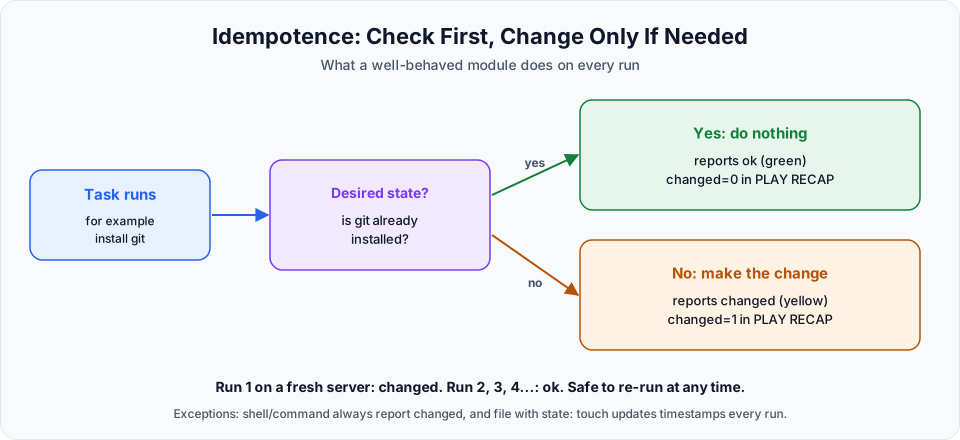
Now run the same playbook a second time. You might expect ok, because the file already exists. Instead you see:
TASK [file creation] ***********************************************************
changed: [172.31.9.250]
state: touch behaves exactly like the Linux touch command: when the file exists, it updates the access and modification timestamps. A new timestamp is a change, so the task reports changed on every single run. That makes changed= in the recap useless for spotting real changes.
The file module has two options to fix this. Setting both timestamps to preserve means "create the file if missing, otherwise leave it alone":
---
- name: Create a marker file on the web servers
  hosts: webservers
  tasks:
    - name: file creation
      ansible.builtin.file:
        path: /home/ansible/telusko.txt
        state: touch
        mode: "0644"
        modification_time: preserve
        access_time: preserve
Run it twice. The first run on a host without the file says changed, every run after that says ok. That is the behaviour you want from every task you write.
| Option | Meaning |
|---|---|
mode: "0644" | Permissions: owner can read and write, everyone else can read. Always quote it, so YAML does not treat it as a number |
modification_time: preserve | Do not change the modification time of an existing file |
access_time: preserve | Do not change the access time of an existing file |
owner, group | Set the owner and group. Changing them to another user needs become: true |
More things the file module can do
- name: Create a directory for application logs
  ansible.builtin.file:
    path: /home/ansible/app/logs
    state: directory
    mode: "0755"

- name: Remove the test file
  ansible.builtin.file:
    path: /home/ansible/alien.txt
    state: absent
state: directory creates app and logs in one go. state: absent deletes the file and reports ok if it was already gone, so it is idempotent too.
Short name or full name
The lecture writes file:. This page also uses ansible.builtin.file:, the fully qualified collection name (FQCN). Both run the same module. The official docs recommend the full name, and you will see it in most real projects.
Try It Yourself
- Create
/home/ansible/reportsas a directory on thedbserversgroup only, with mode0750. - Run the playbook with
state: touch(no preserve options) three times and notechanged=each time. Then add the twopreserveoptions and run it three more times. - Write a cleanup playbook that removes
alien.txtandtelusko.txtfrom all managed nodes. Run it twice and compare the output. - Try
state: filewith a path that does not exist and read the error message.
Official references
- ansible.builtin.file module
- Ansible playbooks: desired state and idempotency
- Patterns: targeting hosts and groups
Written By: Shramik Masti
How is this guide?
Last updated on
Ansible First Playbook
Write and run your first Ansible playbook that pings every managed node, understand the hosts, variables and tasks sections, check syntax and read the PLAY RECAP.
Ansible Git Installation Playbook
Install Git on every managed node with a playbook, understand become for root privileges, choose between yum, dnf, apt and package, and verify the result from the control node.