
Ansible Playbook: Static Website Hosting
Write a three-task playbook that installs the Apache httpd web server, copies an index.html from the control node and starts the service, then open the site in a browser.
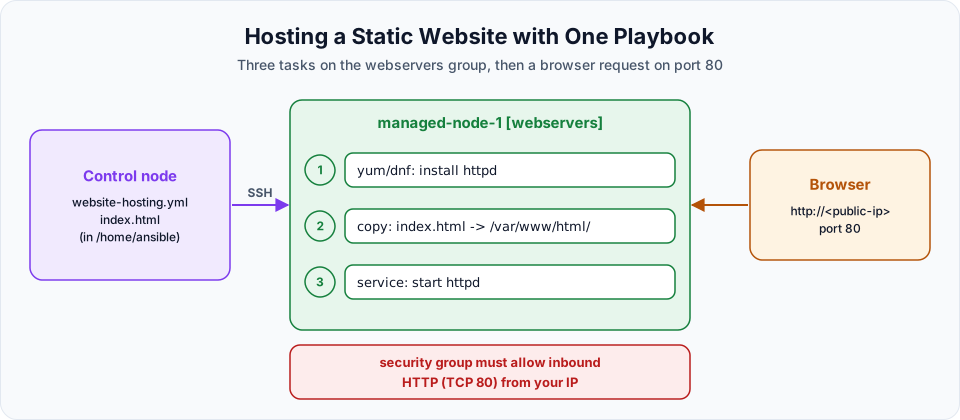
Until now every playbook had a single task. Real configuration is a sequence: install the software, put the files in place, start the service. Ansible runs the tasks of a play in order, top to bottom, so you describe the sequence once and it happens the same way on every server.
This lesson hosts a small static website on the webservers group. The web server is Apache httpd, the package is called httpd on Amazon Linux, and by default it serves files from /var/www/html.
Write the playbook
Start from the Git playbook so you do not have to type the header again:
sudo su - ansible
cat git-install.yml
vi website-hosting.yml---
- hosts: webservers
become: true
tasks:
- name: httpd server installation
yum:
name: httpd
state: latest
- name: copy index.html
copy:
src: index.html
dest: /var/www/html/index.html
- name: start httpd server
service:
name: httpd
state: started
...Three tasks, three modules:
| Task | Module | What it does |
|---|---|---|
| httpd server installation | yum (ansible.builtin.dnf) | Installs the Apache web server package httpd |
| copy index.html | copy (ansible.builtin.copy) | Copies index.html from the control node to the managed node |
| start httpd server | service (ansible.builtin.service) | Starts the httpd service |
hosts: webservers means only managed-node-1 gets a web server. become: true is needed for all three tasks: installing packages, writing into /var/www/html (owned by root) and starting services all require root.
The copy module
| Option | Meaning |
|---|---|
src | The file on the control node. A relative path like index.html is looked up next to the playbook (and in a files/ folder beside it) |
dest | The full path on the managed node |
mode, owner, group | Optional permissions and ownership for the copied file |
/var/www/html is Apache's document root: any file placed there is served by httpd. That is why we copy index.html into it.
The service module
state | Meaning |
|---|---|
started | Start the service if it is not running. Do nothing if it already runs |
stopped | Stop it if it is running |
restarted | Always restart it |
reloaded | Reload the configuration without a full restart |
Check syntax and target hosts
ansible-playbook website-hosting.yml --syntax-check
ansible-playbook website-hosting.yml --list-hosts
playbook: website-hosting.yml
play #1 (webservers): webservers TAGS: []
pattern: ['webservers']
hosts (1):
172.31.9.250One host in the group today. With a hundred web servers in the inventory, the same playbook would set up all hundred.
Create the website
The copy task needs index.html to exist on the control node, next to the playbook. If it is missing, the task fails with Could not find or access 'index.html'. Create it:
vi index.html<h1> Telusko DevOps Learning! </h1>Open port 80
The browser will connect to the web server on port 80. The default security group only allows traffic between instances in the same group, so add an inbound rule before testing: EC2 > Security Groups > (your group) > Edit inbound rules > Add rule, type HTTP, port 80, source My IP. Without it, the page simply never loads (the browser times out).
Run it
ansible-playbook website-hosting.ymlTASK [httpd server installation] **********************************************
changed: [172.31.9.250]
TASK [copy index.html] *********************************************************
changed: [172.31.9.250]
TASK [start httpd server] ******************************************************
changed: [172.31.9.250]
PLAY RECAP *********************************************************************
172.31.9.250 : ok=4 changed=3 unreachable=0 failed=0 skipped=0 rescued=0 ignored=0ok=4 counts Gathering Facts plus the three tasks, and changed=3 means all three actually did something. In the EC2 console, find the public IPv4 address of the instance whose private IP is 172.31.9.250 and open http://<public-ip> in your browser.

The page served by httpd on the web server, deployed entirely from the control node.
Type http://, not https://. We did not set up a TLS certificate, so an HTTPS request gets no answer.
Now run the playbook a second time. All three tasks report ok and the recap says changed=0: httpd is already installed, the file is identical, and the service is already running. Change one line in index.html and run again: only the copy task reports changed.
Make it survive a reboot
state: started starts httpd now, but does not enable it at boot. Stop and start the instance and the site is gone until someone starts the service again. Add enabled: true:
---
- name: Host a static website on the web servers
  hosts: webservers
  become: true
  tasks:
    - name: httpd server installation
      ansible.builtin.dnf:
        name: httpd
        state: present

    - name: copy index.html
      ansible.builtin.copy:
        src: index.html
        dest: /var/www/html/index.html
        owner: root
        group: root
        mode: "0644"

    - name: start httpd server
      ansible.builtin.service:
        name: httpd
        state: started
        enabled: true
enabled: true is the same as running systemctl enable httpd. On systemd machines you can also use ansible.builtin.systemd_service, which has extra systemd options. service works on both systemd and older init systems, so it is a good default.
Common errors
| Symptom | Cause and fix |
|---|---|
Could not find or access 'index.html' | The file is not next to the playbook on the control node. Create it, or give a full src path |
Permission denied on /var/www/html | become: true is missing |
| Browser keeps loading, then times out | Security group has no inbound rule for port 80 |
| Browser shows the Apache test page | index.html was not copied to /var/www/html/index.html. Check the dest path |
Clean up
When you finish, remove the website so the instance does not keep serving it, and delete the port 80 rule if you no longer need it:
ansible webservers -b -m ansible.builtin.service -a "name=httpd state=stopped enabled=false"
ansible webservers -b -m ansible.builtin.dnf -a "name=httpd state=absent"
Try It Yourself
- Add an
about.htmlpage and a second copy task for it. Openhttp://<public-ip>/about.html. - Change the heading in
index.html, run the playbook, and check which task reportschanged. - Add
enabled: true, reboot the web server from the console, and confirm the site comes back by itself. - Move
index.htmlinto afiles/folder next to the playbook and run again. Does thesrc: index.htmlline still work?
Official references
- ansible.builtin.copy module
- ansible.builtin.service module
- ansible.builtin.dnf module
- Security group rules (Amazon VPC)
Written By: Shramik Masti
How is this guide?
Last updated on
Ansible Java maven playbook
Install Maven, and Java along with it, on all managed nodes with a short playbook, verify both versions, and learn how to pin a specific JDK instead of relying on dependencies.
Ansible Variables: Runtime and Playbook Variables
Replace hard-coded values with variables in a playbook, pass them at runtime with --extra-vars or define them under vars, and learn which value wins when both are set.