
Ansible Variables: Runtime and Playbook Variables
Replace hard-coded values with variables in a playbook, pass them at runtime with --extra-vars or define them under vars, and learn which value wins when both are set.
Look at the website playbook from the last lesson. The word httpd appears twice: once in the install task and once in the service task. If you ever switch to a different web server, you must find and change every occurrence, and forgetting one breaks the playbook. A variable gives that value a name, so you write it once and use it anywhere.
The idea is the same as in any programming language: a variable stores data. In Ansible, variables can be defined in many places:
| Type | Where it is defined | Covered |
|---|---|---|
| Runtime variable (extra var) | On the command line, when you run the playbook | This lesson |
| Playbook variable | Inside the playbook, under vars: | This lesson |
| Host variable | For one host, in the inventory or a host_vars/ file | Short intro below |
| Group variable | For a group, in the inventory or a group_vars/ file | Short intro below |
Using a variable in a playbook
Copy the website playbook into a new file:
sudo su - ansible
cat website-hosting.yml
vi vars.yml
Replace both occurrences of httpd with a variable called package_name:
---
- hosts: webservers
  become: true
  tasks:
    - name: httpd server installation
      yum:
        name: "{{ package_name }}"
        state: latest
    - name: copy index.html
      copy:
        src: index.html
        dest: /var/www/html/index.html
    - name: start httpd server
      service:
        name: "{{ package_name }}"
        state: started
...
{{ package_name }} is Jinja2 template syntax. When the task runs, Ansible replaces it with the variable's value. The spaces inside the braces are optional ({{package_name}} as typed in the lecture works too), but {{ package_name }} is the common style.
Quote values that start with {{
In YAML, { at the start of a value means "a dictionary starts here". So name: {{ package_name }} breaks the playbook with a syntax error. When a value starts with {{, wrap the whole value in quotes: name: "{{ package_name }}". A value like /var/www/{{ site }}/index.html does not start with {, so it needs no quotes, although quoting it does no harm.
Variable names may contain letters, numbers and underscores, and must start with a letter or underscore. package_name is valid. package-name and 2nd_package are not.
Runtime variables: pass the value with --extra-vars
The playbook now uses package_name, but nothing defines it. If you run it as it is, Ansible stops with:
fatal: [172.31.9.250]: FAILED! => {"msg": "The task includes an option with an undefined variable. The error was: 'package_name' is undefined..."}Pass the value when you run the playbook:
ansible-playbook vars.yml --extra-vars package_name=httpd--extra-vars (short form -e) sets variables at runtime. The playbook stays generic and the person running it decides the value. The run looks the same as before, and the site still loads in the browser.
There are three ways to write extra vars:
| Form | Example |
|---|---|
key=value pairs | -e "package_name=httpd site_title=Telusko" |
| JSON | -e '{"package_name": "httpd", "ports": [80, 443]}' |
| From a file (YAML or JSON) | -e "@web_vars.yml" |
Values passed as key=value are always strings. Use the JSON form when you need a number, a boolean (true/false) or a list.
Playbook variables: define the value under vars
When the value rarely changes, define it inside the playbook. Add a vars: section to the play, at the same level as hosts, become and tasks:
---
- hosts: webservers
  become: true
  vars:
    package_name: httpd
  tasks:
    - name: httpd server installation
      yum:
        name: "{{ package_name }}"
        state: latest
    - name: copy index.html
      copy:
        src: index.html
        dest: /var/www/html/index.html
    - name: start httpd server
      service:
        name: "{{ package_name }}"
        state: started
...
Now run it without any -e:
ansible-playbook vars.ymlThe value is written once at the top and used in both tasks. Change it in one place and every task follows.
When both are set: precedence
What happens if vars: says httpd and you also pass -e package_name=nginx? Ansible has a fixed order of variable precedence with 22 levels. You do not need to memorise it. Remember the shape, and especially the top:
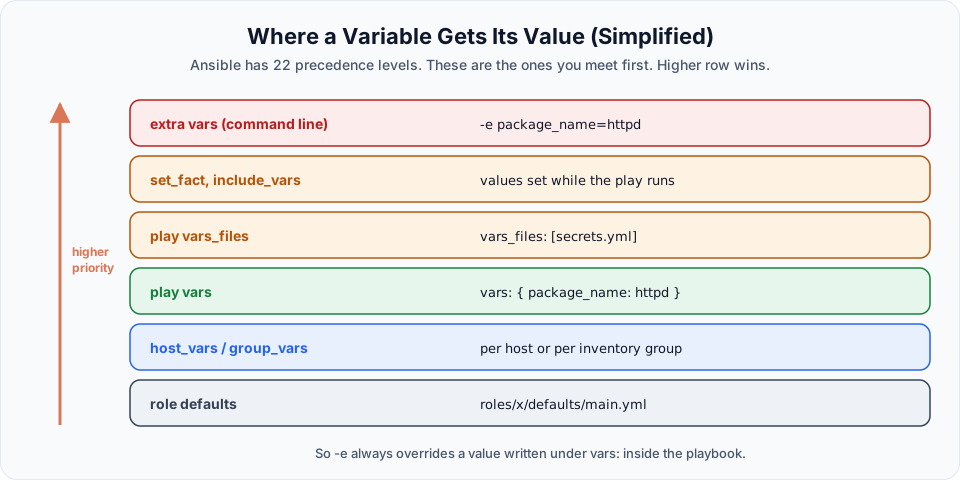
Extra vars always win. A value passed with -e overrides the same variable defined anywhere else. That makes -e perfect for one-off overrides, and a reason to be careful with it.
You can see this with the debug module, which prints messages:
---
- name: Show variable precedence
  hosts: webservers
  gather_facts: false
  vars:
    package_name: httpd
  tasks:
    - name: Print the value Ansible will use
      ansible.builtin.debug:
        msg: "package_name is {{ package_name }}"
ansible-playbook precedence.yml
ansible-playbook precedence.yml -e package_name=nginxok: [172.31.9.250] => {
"msg": "package_name is httpd"
}
...
ok: [172.31.9.250] => {
"msg": "package_name is nginx"
}Host and group variables (a first look)
The lecture mentions two more types. They let different machines get different values from the same playbook.
[webservers]
172.31.9.250 http_port=80

[dbservers]
172.31.12.18

[webservers:vars]
package_name=httpd
http_port=80 on the host line is a host variable: it applies only to that host. The [webservers:vars] section defines a group variable for every host in the group. In bigger projects these move into files such as group_vars/webservers.yml and host_vars/172.31.9.250.yml next to the inventory, which keeps the inventory itself short.
Variables from a separate file
For many variables, or for values you want to keep apart from the playbook (and later encrypt), use vars_files:
package_name: httpd- hosts: webservers
become: true
vars_files:
- web_vars.yml
tasks:
# ...same tasks as beforeThis is the usual way to keep secrets in a file that you then protect with Ansible Vault, the next lesson.
Try It Yourself
- Run
vars.ymlwithoutvars:and without-e, and read the "undefined variable" error. - Add a variable
web_root: /var/www/htmland use it in the copy task'sdestas"{{ web_root }}/index.html". - Run
precedence.ymlwith-e '{"package_name": "httpd"}'(JSON form) and with-e "@web_vars.yml"(file form). - Add
[webservers:vars]withpackage_name=httpdto the inventory, removevars:from the playbook, and run it without-e.
Official references
Written By: Shramik Masti
How is this guide?
Last updated on
Ansible Playbook: Static Website Hosting
Write a three-task playbook that installs the Apache httpd web server, copies an index.html from the control node and starts the service, then open the site in a browser.
Ansible Vault
Encrypt a playbook or variable file with ansible-vault, then view, edit, decrypt and run it with a vault password, and learn how teams keep only the secrets encrypted.