
Ansible Tags
Control which tasks run with handlers and tags, trigger a handler with notify only when a task changes something, and run or skip tagged tasks with --tags and --skip-tags.
By default, a playbook runs every task, top to bottom, every time. Our website playbook installs httpd, copies index.html and starts the service, and it does all three even when you only changed one line of HTML. Two features give you more control:
- Handlers run a task only when another task actually changed something
- Tags let you pick which tasks run, from the command line
This lesson builds both into the website playbook.
Start from the variables playbook
sudo su - ansible
cat vars.yml
vi handlers.yml
Paste the content of vars.yml and change it like this:
---
- hosts: webservers
  become: true
  vars:
    package_name: httpd
  tasks:
    - name: httpd server installation
      yum:
        name: "{{ package_name }}"
        state: latest
      tags:
        - install
    - name: copy index.html
      copy:
        src: index.html
        dest: /var/www/html/index.html
      tags:
        - copy
      notify:
        - start httpd server
  handlers:
    - name: start httpd server
      service:
        name: "{{ package_name }}"
        state: started
...
What changed compared to vars.yml:
| Change | Meaning |
|---|---|
tags: [install] on the first task | Gives the task a label we can select or skip from the command line |
tags: [copy] on the second task | Same, a different label |
notify: start httpd server on the copy task | "If this task changes something, tell the handler with this name" |
handlers: section | Holds tasks that run only when notified. The third task moved here |
Indentation matters a lot here. tags and notify belong to the task, so they line up with name and copy of that task. handlers belongs to the play, so it lines up with hosts, vars and tasks.
If --syntax-check complains
In the lecture, the first --syntax-check fails with an error pointing at the handler (The offending line appears to be: - name: start httpd server). The cause was indentation inside handlers:. Line up the handler exactly like a task (a - name: item with its module indented below it) and the check passes. The error's line number is usually right next to the real problem.
Handlers: run only when something changed
ansible-playbook handlers.yml --syntax-check
ansible-playbook handlers.yml
TASK [httpd server installation] **********************************************
ok: [172.31.9.250]
TASK [copy index.html] *********************************************************
ok: [172.31.9.250]
PLAY RECAP *********************************************************************
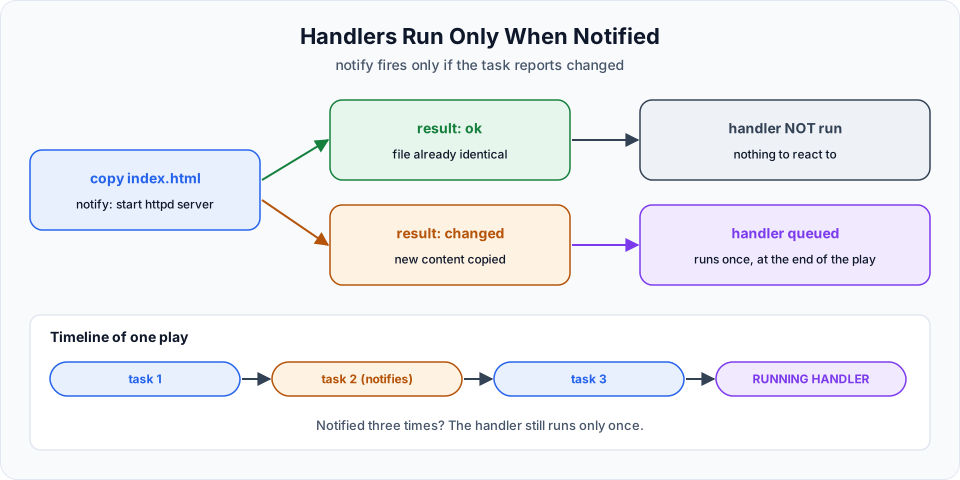
172.31.9.250 : ok=3 changed=0 unreachable=0 failed=0 skipped=0 rescued=0 ignored=0The handler did not run at all. index.html on the server is already identical to the one on the control node, so the copy task reported ok, and a task that changes nothing notifies nobody.
Now change the website:
vi index.html<h1> Telusko DevOps Learning! </h1>
<h2> Visit courses.telusko.com </h2>Run the playbook again:
TASK [copy index.html] *********************************************************
changed: [172.31.9.250]

RUNNING HANDLER [start httpd server] *******************************************
ok: [172.31.9.250]

PLAY RECAP *********************************************************************
172.31.9.250   : ok=4    changed=1    unreachable=0    failed=0    skipped=0    rescued=0    ignored=0
This time the copy reported changed, so the handler ran (RUNNING HANDLER). Refresh the browser and the new line is there.
How handlers behave, according to the official docs:
- A handler runs only if a task that notifies it reports
changed - Handlers run after all the tasks in the play have finished, not immediately after the notifying task
- If several tasks notify the same handler, it still runs only once
notifyuses the handler'sname, so handler names must be unique- If a later task fails, notified handlers do not run, unless you use
--force-handlers
Restart is what a handler usually does
Notice that the handler printed ok, not changed: httpd was already running, so state: started had nothing to do. Apache serves the new index.html without any restart anyway. The classic use of a handler is a configuration change that only takes effect after a restart: copy a new httpd.conf, then notify a handler with state: restarted. That way the service restarts only when its config actually changed, never on every run.
  tasks:
    - name: Deploy Apache config
      ansible.builtin.copy:
        src: httpd.conf
        dest: /etc/httpd/conf/httpd.conf
      notify: Restart httpd

  handlers:
    - name: Restart httpd
      ansible.builtin.service:
        name: httpd
        state: restarted
notify accepts a single name (as here) or a list of names (as in handlers.yml).
Tags: choose which tasks run
The lecture adds the tags but does not run them, so let's use them. Without any tag option, every task runs, just like before. With --tags, only the tasks carrying one of those tags run:
ansible-playbook handlers.yml --tags copyTASK [Gathering Facts] *********************************************************
ok: [172.31.9.250]
TASK [copy index.html] *********************************************************
ok: [172.31.9.250]The install task is not even shown: it was skipped because it does not have the copy tag. This is exactly what you want when you only changed the website: no time spent checking packages. --skip-tags does the opposite, it runs everything except the tagged tasks:
ansible-playbook handlers.yml --skip-tags install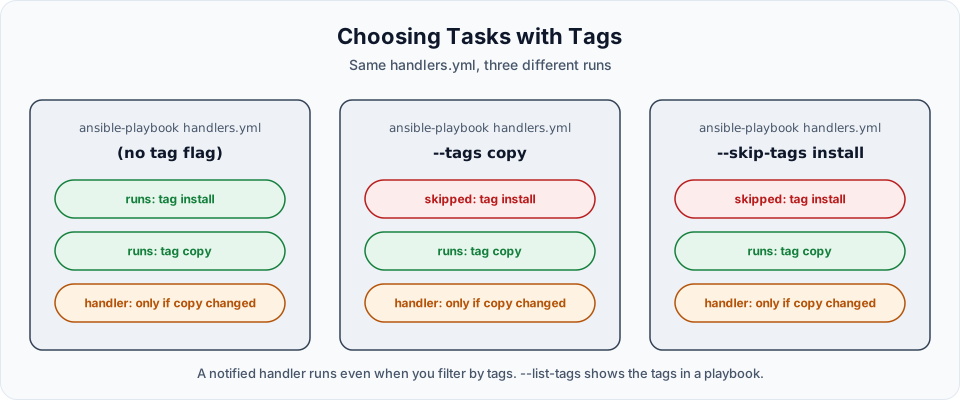
| Option | Effect |
|---|---|
| (none) | Run all tasks, same as --tags all |
--tags copy | Run only tasks tagged copy (plus tasks tagged always) |
--tags install,copy | Run tasks with either tag |
--skip-tags install | Run all tasks except those tagged install |
--list-tags | Show all tags in the playbook without running anything |
--list-tasks | Show the tasks, and with --tags, which ones would run |
ansible-playbook handlers.yml --list-tagsplaybook: handlers.yml
play #1 (webservers): webservers TAGS: []
TASK TAGS: [copy, install]A few rules worth knowing:
- Tasks without a tag are skipped when you use
--tags. Tag every task you might want to run on its own - If a task matches both
--tagsand--skip-tags, skipping wins - Two special tags: a task tagged
alwaysruns even with--tags(unless you skipalways), and a task taggedneverruns only when you ask for it by name with--tags - Handlers ignore tags. If a task that ran notifies a handler, the handler runs, whatever tags you selected
Try It Yourself
- Run
handlers.ymltwice without changing anything and confirm the handler never runs. - Change
index.html, then run with--skip-tags copy. Did the handler run? Why not? - Add a third task that creates
/var/www/html/health.htmlwithansible.builtin.copyandcontent: "OK", tag ithealth, and run only that task with--tags health. - Add a debug task tagged
neverand show that it runs only with--tags never. - Rewrite the handler as
Restart httpdwithstate: restarted, deploy a small change to/etc/httpd/conf.d/telusko.conf, and watch the restart happen only when the file changes.
Official references
Written By: Shramik Masti
How is this guide?
Last updated on
Ansible Vault
Encrypt a playbook or variable file with ansible-vault, then view, edit, decrypt and run it with a vault password, and learn how teams keep only the secrets encrypted.
Getting Started
A practical roadmap for learning Kubernetes on Amazon EKS, from your first cluster and pod to Deployments, storage, autoscaling, Helm, Argo CD, monitoring and blue-green releases.