
Ansible Vault
Encrypt a playbook or variable file with ansible-vault, then view, edit, decrypt and run it with a vault password, and learn how teams keep only the secrets encrypted.
A playbook is a plain text file. Anyone who can log in to the control node, or who can see your Git repository, can run cat on it and read everything inside. That is fine for name: httpd. It is not fine for a database password, an API token or a private key, and real playbooks need those all the time.
Ansible Vault encrypts files (or single values) with a password, so they are stored as unreadable text. Ansible decrypts them in memory only when it needs them, and only if you supply the vault password. The tool is ansible-vault, and it is installed together with Ansible.
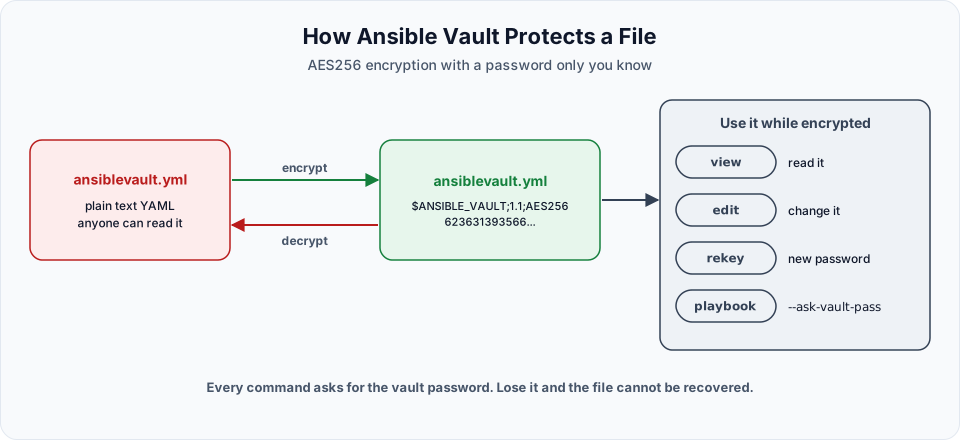
The problem: a readable playbook
The lecture copies the variables playbook into ansiblevault.yml:
---
- hosts: webservers
  become: true
  vars:
    package_name: httpd
  tasks:
    - name: install httpd package
      yum:
        name: "{{ package_name }}"
        state: latest
    - name: copy index.html file
      copy:
        src: index.html
        dest: /var/www/html/index.html
    - name: start httpd server
      service:
        name: "{{ package_name }}"
        state: started
...
cat ansiblevault.yml prints all of it, and vi ansiblevault.yml lets you change it. Imagine vars: also contained db_password: S3cret!.
Encrypt the file
ansible-vault encrypt ansiblevault.ymlNew Vault password:
Confirm New Vault password:
Encryption successfulChoose a strong password and remember it. Now look at the file again:
cat ansiblevault.yml$ANSIBLE_VAULT;1.1;AES256
37366633530373265663832393938643739353134333432336139363303032643134373733376639
62383435646665616316564386433663036316336386131640a323235333165343934623661333463
...The first line is the vault header: format version 1.1 and the cipher, AES256. Everything after it is the encrypted content. Opening the file in vi shows the same unreadable text, so there is nothing useful to edit.
View it without decrypting
When you only need to read the file:
ansible-vault view ansiblevault.ymlIt asks for the vault password and prints the original YAML on the screen. The file on disk stays encrypted.
Edit it while it stays encrypted
ansible-vault edit ansiblevault.ymlAfter the password, the decrypted content opens in your editor (the one in the $EDITOR environment variable, vi by default). Make your changes and save with :wq. Ansible encrypts the file again on save. The plain text only ever exists in a temporary file while the editor is open.
Decrypt it permanently
ansible-vault decrypt ansiblevault.ymlVault password:
Decryption successfulThe file is back to plain YAML and cat shows everything again. The lecture then encrypts it once more, opens it with vi to show it is unreadable, uses ansible-vault edit to change it, and finally decrypts it again.
| Command | What it does | File on disk afterwards |
|---|---|---|
ansible-vault create <file> | Opens your editor for a new file and saves it encrypted | Encrypted |
ansible-vault encrypt <file> | Encrypts an existing file | Encrypted |
ansible-vault view <file> | Shows the content | Still encrypted |
ansible-vault edit <file> | Opens the content in an editor, re-encrypts on save | Still encrypted |
ansible-vault decrypt <file> | Removes the encryption | Plain text |
ansible-vault rekey <file> | Changes the vault password | Encrypted with the new password |
ansible-vault encrypt_string | Encrypts a single value to paste into a YAML file | (prints output, no file) |
Run an encrypted playbook
The lecture stops after decrypting, but the reason you encrypt is that Ansible can still use the file. Encrypt it again and run it:
ansible-vault encrypt ansiblevault.yml
ansible-playbook ansiblevault.yml
ERROR! Attempting to decrypt but no vault secrets foundAnsible needs the password. Ask for it with --ask-vault-pass. From ansible-core 2.16 onwards there is also a short form, -J, but the 2.15 we installed in the lab only accepts the long one:
ansible-playbook ansiblevault.yml --ask-vault-passVault password:
PLAY [webservers] **************************************************************
...The playbook runs normally. Ansible decrypted it in memory and the file on disk never became plain text.
Without typing the password every time
For automation (a Jenkins job, a cron job), nobody is there to type. Put the password in a file that only you can read and point Ansible to it:
echo 'your-vault-password' > ~/.vault_pass
chmod 600 ~/.vault_pass
ansible-playbook ansiblevault.yml --vault-password-file ~/.vault_pass
Never commit the password file
The vault password file must stay outside your Git repository (or be listed in .gitignore). An encrypted file next to its password is not protected at all. In CI tools, store the vault password in the tool's credential store instead of a file on disk.
What teams actually encrypt
Encrypting the whole playbook works, but it makes code review hard: nobody can read the tasks in a pull request. The usual practice is to keep tasks in plain text and encrypt only the secrets:
ansible-vault create secrets.ymldb_password: S3cret!---
- name: Configure the app servers
hosts: webservers
become: true
vars_files:
- secrets.yml
tasks:
- name: Show that the secret is available (never do this with real secrets)
ansible.builtin.debug:
msg: "Password length is {{ db_password | length }}"ansible-playbook app.yml --ask-vault-passAnsible notices that secrets.yml is a vault file, decrypts it with the password you gave, and the tasks can use db_password like any other variable. For a single value inside an otherwise plain file, ansible-vault encrypt_string 'S3cret!' --name 'db_password' prints an encrypted block you can paste straight into YAML.
What vault does and does not protect
Vault protects the content of a file: without the password, nobody can read it. It does not stop someone with write access from deleting or overwriting the file. Use normal Linux permissions and Git history for that. And if you lose the vault password, the encrypted data cannot be recovered, so store it in a password manager.
Try It Yourself
- Encrypt a copy of
vars.yml, then runcat,ansible-vault viewandansible-vault editon it. - Run the encrypted playbook once without and once with
--ask-vault-pass. - Change the vault password with
ansible-vault rekeyand confirm the old password no longer works. - Create
secrets.ymlwithansible-vault create, load it throughvars_files, and print the length of the secret withdebug.
Official references
- Protecting sensitive data with Ansible Vault
- Encrypting content with Ansible Vault
- Using encrypted variables and files
Written By: Shramik Masti
How is this guide?
Last updated on
Ansible Variables: Runtime and Playbook Variables
Replace hard-coded values with variables in a playbook, pass them at runtime with --extra-vars or define them under vars, and learn which value wins when both are set.
Ansible Tags
Control which tasks run with handlers and tags, trigger a handler with notify only when a task changes something, and run or skip tagged tasks with --tags and --skip-tags.