
Stream Basics
A Stream in Java (introduced in Java 8) represents a sequence of elements that supports functional-style operations for processing data. Unlike collections, a stream does not store data, instead, it provides a declarative way to perform computations on data from various sources such as collections, arrays, or I/O channels.
Streams enable concise, readable, and potentially parallelizable code for complex data processing tasks.
What is a Stream?
A stream can be understood as a pipeline of operations applied to data.
Key Characteristics
- Not a data structure; it does not store elements
- Provides a view of data from a source
- Supports functional-style operations
- Uses lazy evaluation for efficiency
- Can represent finite or infinite sequences
- Consumable (single-use only)
- Does not modify the original data source
Example:
List<String> names = Arrays.asList("Alice", "Bob", "Charlie");

names.stream()
     .filter(name -> name.length() > 3)
     .forEach(System.out::println);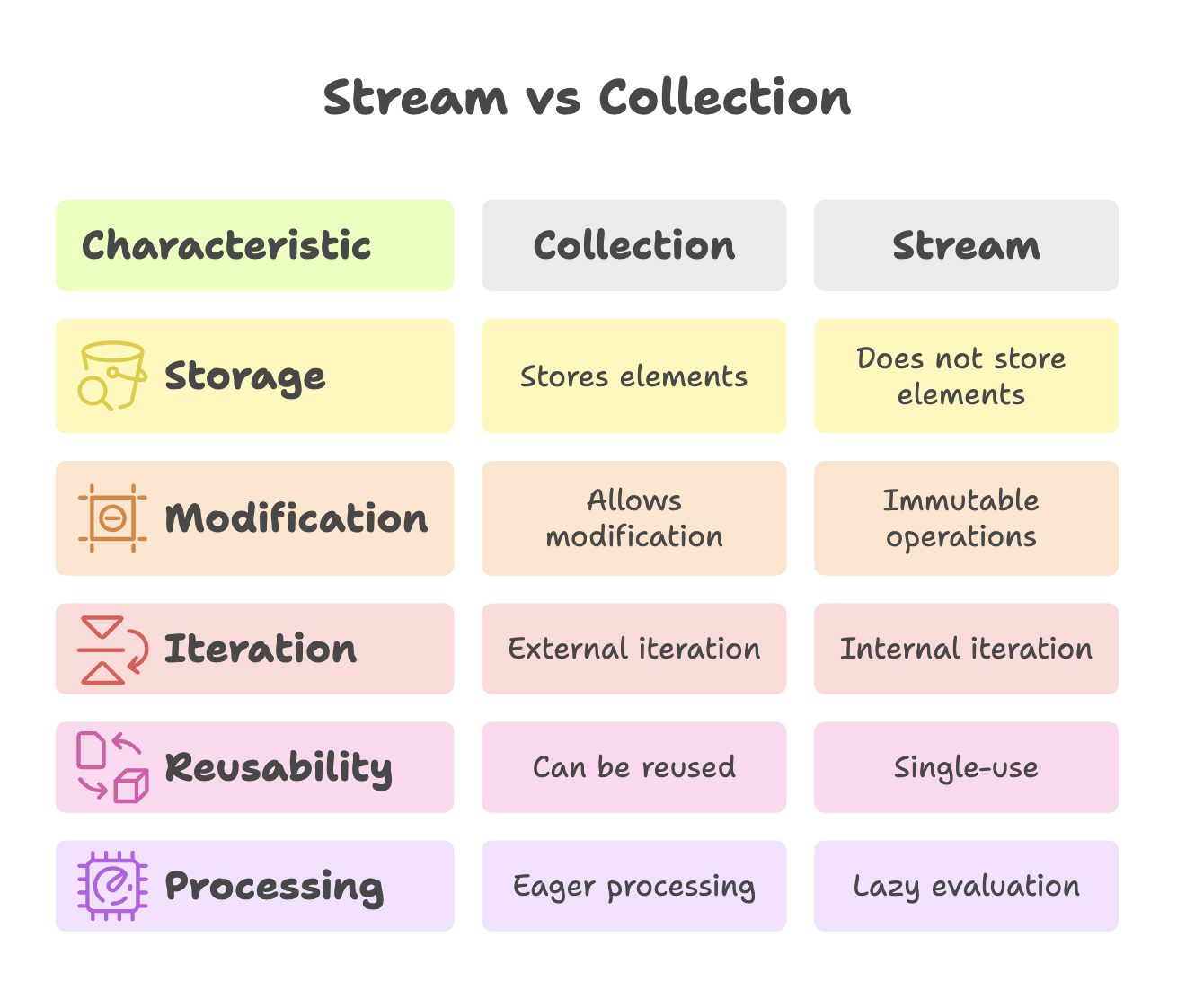
Stream Pipeline
Stream processing occurs through a pipeline consisting of three parts:
1. Source
The data origin, such as a collection, array, file, or generator.
List<String> names = Arrays.asList("Alice", "Bob", "Charlie");
Stream<String> stream = names.stream();
2. Intermediate Operations
Operations that transform one stream into another stream. These operations are lazy and executed only when a terminal operation is invoked.
Common intermediate operations:
filter()- selects elements based on a conditionmap()- transforms elementsflatMap()- flattens nested structuresdistinct()- removes duplicatessorted()- sorts elementslimit()- restricts the number of elementsskip()- ignores a number of elementspeek()- performs an action mainly for debugging
Example:
List<String> result = names.stream()
    .filter(n -> n.length() > 3)
    .map(String::toUpperCase)
    .sorted()
    .toList();
3. Terminal Operations
Terminal operations trigger execution of the pipeline and produce a result or side effect.
Common terminal operations:
forEach()- performs an action on each elementcollect()- accumulates elements into a collection or valuereduce()- combines elements into a single resultcount()- counts elementsfindFirst()/findAny()- retrieves an elementanyMatch()/allMatch()/noneMatch()- evaluates conditionsmin()/max()- finds extreme values
Example:
long count = names.stream()
                  .filter(n -> n.length() > 3)
                  .count();
Creating Streams
Streams can be created from multiple sources.
From Collections
List<String> list = Arrays.asList("A", "B", "C");
Stream<String> stream = list.stream();
Stream<String> parallelStream = list.parallelStream();
From Arrays
String[] array = {"A", "B", "C"};
Stream<String> stream = Arrays.stream(array);
Using Stream.of()
Stream<Integer> stream = Stream.of(1, 2, 3, 4, 5);Infinite Streams
Streams can represent unbounded sequences.
Stream<Integer> numbers = Stream.iterate(0, n -> n + 1);
numbers.limit(5).forEach(System.out::println);
From Files or I/O
try (Stream<String> lines = Files.lines(Paths.get("file.txt"))) {
    lines.forEach(System.out::println);
}
Primitive Streams
Java provides specialized streams for primitive types:
IntStreamLongStreamDoubleStream
These avoid boxing and unboxing overhead, improving performance.
Example:
IntStream range = IntStream.rangeClosed(1, 5);
int sum = range.sum();
Primitive streams also provide useful methods such as average(), max(), min(), and summaryStatistics().
Lazy Evaluation
Intermediate operations are not executed immediately. Execution occurs only when a terminal operation is invoked.
Example:
Stream<String> stream = names.stream()
    .filter(n -> {
        System.out.println("Filtering: " + n);
        return n.length() > 3;
    });

System.out.println("No processing yet");

stream.forEach(System.out::println);
This approach improves efficiency because only the necessary elements are processed.
Short-Circuiting Operations
Some operations terminate processing early when a result is determined.
Examples:
findFirst()findAny()anyMatch()limit()
Optional<String> first = names.stream()
    .filter(n -> n.startsWith("C"))
    .findFirst();
Stream Consumption (Single Use)
Streams can be traversed only once. After a terminal operation, the stream is considered consumed and cannot be reused.
Stream<String> stream = Stream.of("A", "B", "C");

stream.forEach(System.out::println);

// stream.count();  // IllegalStateException
To reuse logic, create a new stream from the source.
Parallel Streams
Streams can process data in parallel to leverage multi-core processors.
list.parallelStream()
    .filter(x -> x > 10)
    .forEach(System.out::println);
Parallel streams simplify concurrent data processing but may not preserve order unless explicitly required.
Best Practices
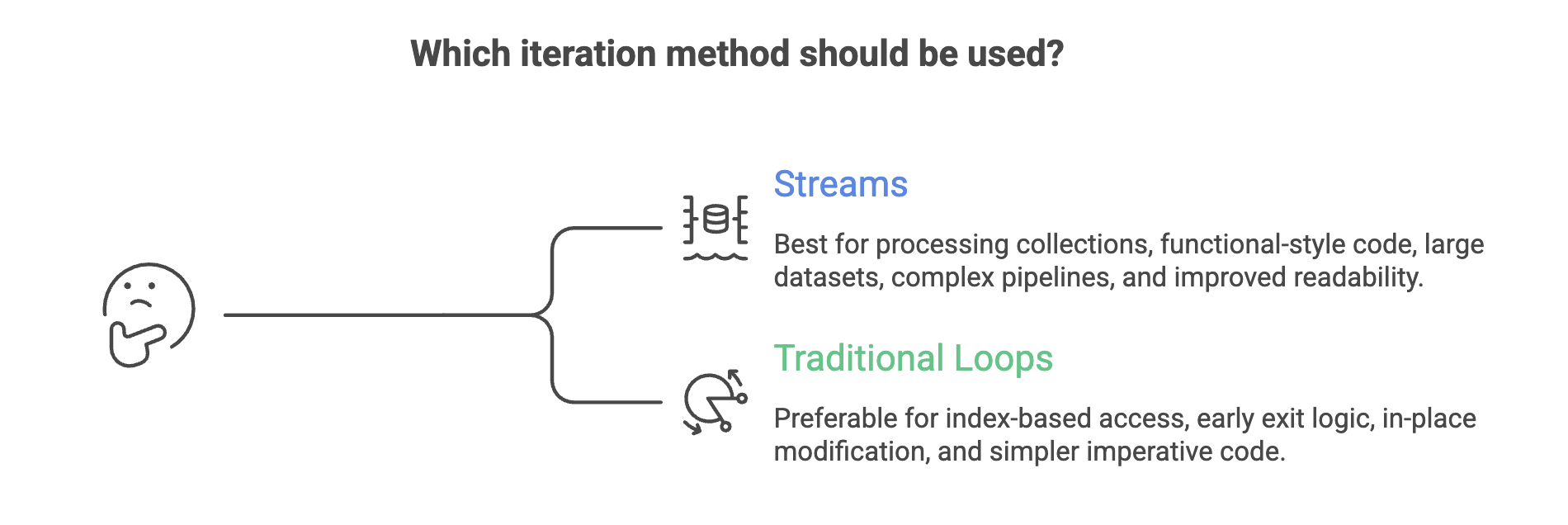
- Prefer streams for data transformation pipelines
- Use primitive streams for numeric operations to improve performance
- Avoid side effects within stream operations
- Close streams from I/O sources using try-with-resources
- Do not modify the source collection during streaming
- Use method references for cleaner code when applicable
When to Use Streams
Summary
- A Stream in Java is a sequence of elements used for functional-style data processing and does not store data itself.
- Stream processing follows a pipeline model: Source → Intermediate Operations (lazy) → Terminal Operation (execution).
- Intermediate operations transform data lazily, while terminal operations trigger computation and produce results or side effects.
- Streams are single-use, support parallel processing, and do not modify the original data source.
- Primitive streams (
IntStream,LongStream,DoubleStream) improve performance by avoiding boxing overhead.
Written By: Muskan Garg
How is this guide?
Last updated on