
HashMap Internals
HashMap is one of the most widely used data structures in Java, providing fast O(1) average-case performance for insertions, deletions, and lookups. Understanding HashMap internals is crucial for:
- Writing efficient code
- Avoiding performance pitfalls
- Debugging issues
- Acing technical interviews
HashMap is part of the Java Collections Framework and implements the Map interface, storing key-value pairs with no guaranteed order.
What is a HashMap?
HashMap is a hash table-based implementation of the Map interface that:
- Stores data as key-value pairs
- Uses hashing to determine storage location
- Allows one null key and multiple null values
- Provides O(1) average time complexity for basic operations
- Is not synchronized (not thread-safe)
- Maintains no order of elements
Map<String, Integer> map = new HashMap<>();
map.put("Alice", 25);    // Store key-value pair
map.put("Bob", 30);
int age = map.get("Alice");  // Retrieve value: 25
Core Concepts
1. Hash Function
A hash function converts a key into an integer (hash code) to determine the storage location.
Process:
int hash = key.hashCode();              // Get hash code
int index = hash & (capacity - 1);      // Calculate bucket index
Example:
String key = "Alice";
int hashCode = key.hashCode();          // 63658432
int capacity = 16;                       // Default initial capacity
int index = hashCode & (capacity - 1);  // 0 (bucket index)
2. Buckets (Array)
HashMap internally uses an array of nodes (buckets) to store entries.
┌─────────────────────────────────────┐
│      HashMap Internal Array         │
├─────────────────────────────────────┤
│  Index 0: Node → Node → Node        │  (Linked List)
│  Index 1: null                      │
│  Index 2: Node → Node               │
│  Index 3: null                      │
│  Index 4: Node                      │
│  ...                                │
│  Index 15: Node → Node → Node → ... │
└─────────────────────────────────────┘
Each bucket can contain:
- null (empty)
- Single node (one entry)
- Linked list of nodes (collision handling)
- Red-Black Tree (Java 8+, when list becomes too long)
3. Hash Collision
Collision occurs when two different keys produce the same bucket index.
// Collision example
String key1 = "Aa";  // hashCode: 2112
String key2 = "BB";  // hashCode: 2112
// Both map to same bucket!
Handling Collisions:
- Chaining (Separate Chaining): Store colliding entries in a linked list
- Treeification (Java 8+): Convert list to Red-Black Tree when list size ≥ 8
HashMap Internal Structure
Node (Entry)
Each entry in HashMap is stored as a Node:
static class Node<K,V> implements Map.Entry<K,V> {
    final int hash;       // Cached hash code
    final K key;          // Key
    V value;              // Value
    Node<K,V> next;       // Reference to next node (for chaining)

    Node(int hash, K key, V value, Node<K,V> next) {
        this.hash = hash;
        this.key = key;
        this.value = value;
        this.next = next;
    }
}
Visual Representation:
[hash: 2112 | key: "Alice" | value: 25 | next: →] → [hash: 3443 | key: "Bob" | value: 30 | next: null]TreeNode (Java 8+)
When a bucket's linked list grows too large (≥8 nodes), it converts to a Red-Black Tree for better performance.
static final class TreeNode<K,V> extends LinkedHashMap.Entry<K,V> {
    TreeNode<K,V> parent;  // Red-Black Tree structure
    TreeNode<K,V> left;
    TreeNode<K,V> right;
    TreeNode<K,V> prev;
    boolean red;
}
Why Treeification?
- Worst-case linked list:
O(n)lookup - Red-Black Tree:
O(log n)lookup - Improves performance when many collisions occur
HashMap Operations
1. put() Operation
Steps:
- Calculate hash code of key
- Determine bucket index
- Check if key exists (update value if yes)
- Add new node if key doesn't exist
- Handle collisions (chaining or treeification)
- Resize if load factor threshold exceeded
Example:
Map<String, Integer> map = new HashMap<>();
map.put("Alice", 25);  // Bucket calculated, node created
map.put("Bob", 30);    // Different bucket
map.put("Alice", 26);  // Same key, value updated to 26
2. get() Operation
Steps:
- Calculate hash code of key
- Determine bucket index
- Check first node
- Traverse linked list or tree if needed
- Return value or null
Example:
Map<String, Integer> map = new HashMap<>();
map.put("Alice", 25);
int age = map.get("Alice");  // Returns 25
int missing = map.get("Charlie");  // Returns null (or throws NPE if unboxing)
3. remove() Operation
Steps:
- Calculate hash and find bucket
- Locate node with matching key
- Remove node from list or tree
- Return removed value
Example:
map.remove("Alice"); // Removes entry, returns 25HashMap Parameters
1. Initial Capacity
Definition: Number of buckets in the hash table at creation.
Default: 16
// Default capacity
Map<String, Integer> map1 = new HashMap<>();  // Capacity: 16

// Custom capacity
Map<String, Integer> map2 = new HashMap<>(32);  // Capacity: 32
Note: Capacity is always a power of 2 (16, 32, 64, 128, ...).
Why Power of 2?
- Enables fast modulo operation:
hash & (capacity - 1)instead ofhash % capacity - Better hash distribution
2. Load Factor
Definition: Threshold at which HashMap resizes.
Formula: Load Factor = Number of Entries / Capacity
Default: 0.75
// Default load factor (0.75)
Map<String, Integer> map1 = new HashMap<>();

// Custom load factor
Map<String, Integer> map2 = new HashMap<>(16, 0.5f);
Threshold: Threshold = Capacity × Load Factor
Example:
- Capacity: 16
- Load Factor: 0.75
- Threshold: 16 × 0.75 = 12
When size reaches 12, HashMap resizes (doubles capacity).
Trade-off:
- Higher load factor (0.9): Less memory, more collisions
- Lower load factor (0.5): More memory, fewer collisions
3. Threshold
Definition: Maximum number of entries before resizing.
Calculation: Threshold = Initial Capacity × Load Factor
Default: 16 × 0.75 = 12
Resizing (Rehashing)
When the number of entries exceeds the threshold, HashMap doubles its capacity and rehashes all entries.
Process:
- Create new array with double capacity
- Recalculate index for each entry
- Move entries to new array
- Update threshold
Example:
Initial: Capacity = 16, Threshold = 12
Add 12 entries → Resize triggered
New: Capacity = 32, Threshold = 24
Performance Impact:
- Resizing is expensive:
O(n)operation - Pre-sizing HashMap can avoid resizing:
// If you know you'll have 100 entries
int expectedSize = 100;
int capacity = (int) (expectedSize / 0.75) + 1;  // 134
Map<String, Integer> map = new HashMap<>(capacity);
Collision Handling Evolution
Java 7 and Earlier: Linked List Only
Bucket 5: Node1 → Node2 → Node3 → Node4 → Node5 → ...Problem: Worst case O(n) for deeply colliding buckets.
Java 8+: Linked List + Red-Black Tree
Strategy:
- List size < 8: Use linked list
- List size ≥ 8: Convert to Red-Black Tree (treeification)
- Tree size ≤ 6: Convert back to linked list (untreeification)
Bucket 5 (size < 8):
Node1 → Node2 → Node3 → Node4

Bucket 5 (size ≥ 8):
       Node5
      /     \
   Node2    Node8
   /  \      /  \
Node1 Node3 Node7 Node9
Benefits:
- Improved worst-case performance:
O(log n)instead ofO(n) - Protection against hash collision attacks
Constants:
static final int TREEIFY_THRESHOLD = 8;   // Convert to tree
static final int UNTREEIFY_THRESHOLD = 6; // Convert to list
static final int MIN_TREEIFY_CAPACITY = 64; // Min capacity for treeification
HashMap vs HashTable vs ConcurrentHashMap
| Feature | HashMap | HashTable | ConcurrentHashMap |
|---|---|---|---|
| Thread Safety | Not synchronized | Synchronized | Concurrent (lock striping) |
| Null Keys | 1 null key allowed | Not allowed | Not allowed |
| Null Values | Multiple allowed | Not allowed | Not allowed |
| Performance | Fast (no locking) | Slow (full lock) | Fast (fine-grained locking) |
| Iteration | Fail-fast | Fail-fast | Fail-safe |
| Legacy | No | Yes (avoid) | No |
Common Pitfalls
1. Mutable Keys
Problem: Changing a key after insertion breaks HashMap.
class Person {
    String name;
    int age;

    // hashCode() based on name and age
    @Override
    public int hashCode() {
        return Objects.hash(name, age);
    }
}

Person person = new Person("Alice", 25);
map.put(person, "Data");

person.age = 26;  // CHANGED KEY!
map.get(person);  // Returns null (hash changed!)
Solution: Use immutable keys (String, Integer, or immutable custom objects).
2. Poor hashCode() Implementation
Problem: All objects hash to same value → all entries in one bucket.
// Bad hashCode
@Override
public int hashCode() {
    return 1;  // All objects have same hash!
}
Result: Degrades to O(n) performance (linked list).
Solution: Properly implement hashCode() with good distribution.
@Override
public int hashCode() {
    return Objects.hash(field1, field2, field3);
}
3. Not Overriding equals()
Problem: hashCode() overridden but not equals().
class Key {
    int id;

    @Override
    public int hashCode() {
        return id;
    }

    // Missing equals()!
}

Key k1 = new Key(1);
Key k2 = new Key(1);
map.put(k1, "Value");
map.get(k2);  // Returns null (different objects, equals() uses ==)
Solution: Always override both hashCode() and equals() together.
@Override
public boolean equals(Object o) {
    if (this == o) return true;
    if (o == null || getClass() != o.getClass()) return false;
    Key key = (Key) o;
    return id == key.id;
}
4. Concurrent Modification
Problem: Modifying HashMap during iteration.
for (String key : map.keySet()) {
    map.remove(key);  // ConcurrentModificationException!
}
Solution: Use iterator's remove() method.
Iterator<String> it = map.keySet().iterator();
while (it.hasNext()) {
    String key = it.next();
    it.remove();  // Safe removal
}
Performance Characteristics
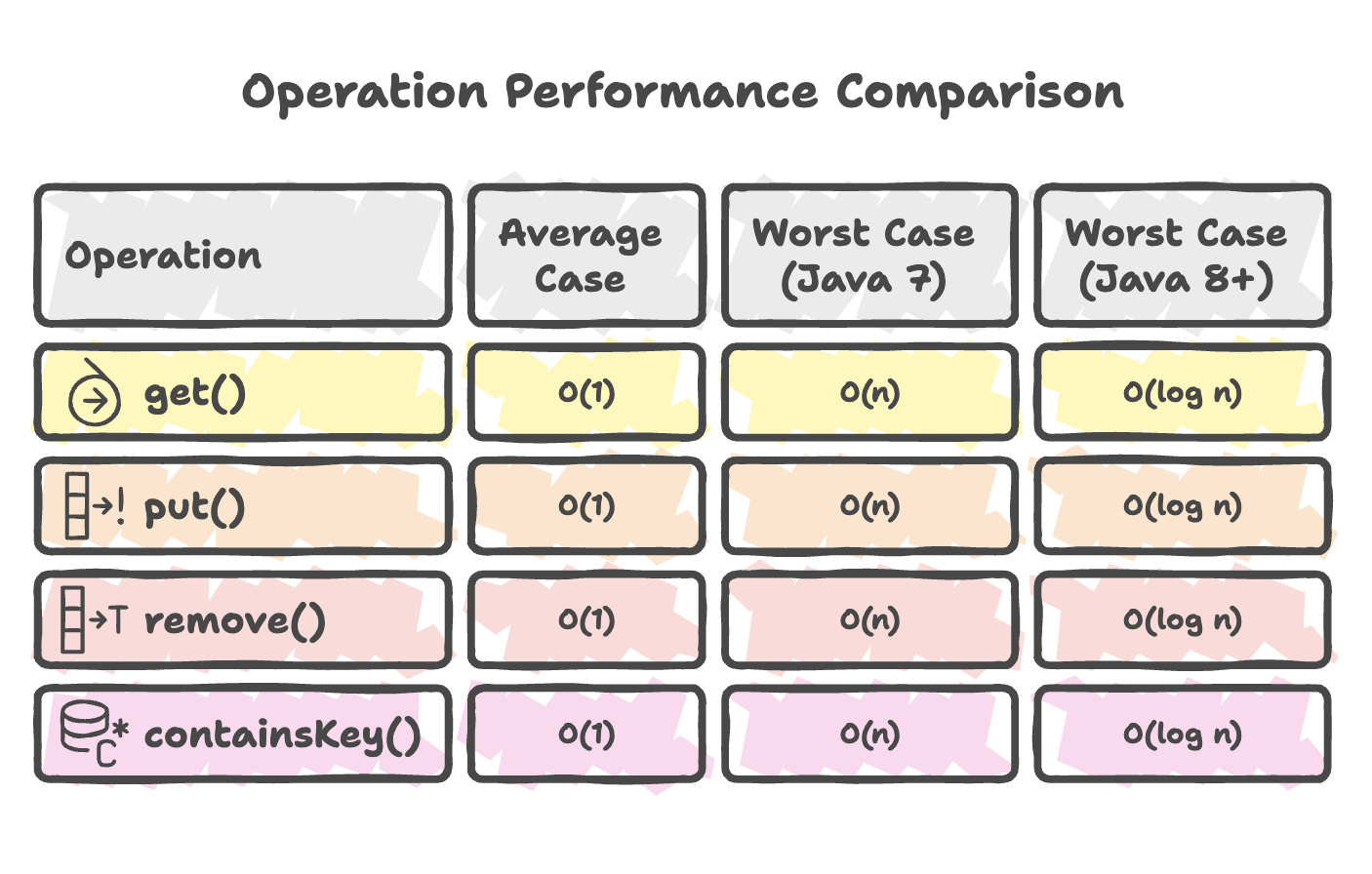
Space Complexity: O(n) where n is the number of entries.
Practical Examples
Example 1: Word Frequency Counter
public Map<String, Integer> countWords(String text) {
    Map<String, Integer> frequency = new HashMap<>();

    String[] words = text.split("\\s+");
    for (String word : words) {
        frequency.put(word, frequency.getOrDefault(word, 0) + 1);
    }

    return frequency;
}

// Usage
String text = "hello world hello java world";
Map<String, Integer> counts = countWords(text);
// {hello=2, world=2, java=1}
Example 2: Two Sum Problem
public int[] twoSum(int[] nums, int target) {
    Map<Integer, Integer> map = new HashMap<>();

    for (int i = 0; i < nums.length; i++) {
        int complement = target - nums[i];
        if (map.containsKey(complement)) {
            return new int[] { map.get(complement), i };
        }
        map.put(nums[i], i);
    }

    return new int[] { -1, -1 };
}

// Usage
int[] nums = {2, 7, 11, 15};
int[] result = twoSum(nums, 9);  // [0, 1]
Summary
- HashMap is a widely used data structure in Java that stores key–value pairs using an internal array of buckets with hashing for fast data access.
- It handles hash collisions using linked lists and automatically converts long collision chains into Red-Black Trees (Java 8+) to maintain efficient lookup performance.
- Core operations such as
put(),get(), andremove()generally provide O(1) average time complexity, although resizing operations can temporarily impact performance. - Important configuration parameters include initial capacity, load factor, and threshold, which control when resizing occurs and influence overall performance.
- Efficient usage requires properly implementing
hashCode()andequals()methods, using immutable keys, and pre-sizing the map when the expected size is known. - HashMap is not thread-safe, for concurrent environments, alternatives such as
ConcurrentHashMapor synchronized wrappers should be used.
Written By: Muskan Garg
How is this guide?
Last updated on