
Preparing Project Context
Pick the right model for implementation, read the context window like a battery indicator, and manage compaction yourself instead of leaving it to chance.
Before writing the first line of backend code, let us set up the session properly. This is context engineering: making sure Claude has exactly the information it needs, and nothing that wastes space.
Pick the right model for the job
Run /context and you will see the context window size for your current model. Different models have different strengths:
| Phase | Model | Why |
|---|---|---|
| Planning, architecture | Opus | Best reasoning, but expensive. You run out of tokens quickly if you use it for everything |
| Implementation | Sonnet | Strong coding at a lower cost |
| Small, clear tasks | Haiku | Fast and cheap |
For building the backend from our specs, Sonnet is the right choice:
/model sonnetRun /context again. The window size depends on the model and your plan. In the video, Opus showed a 1 million token window and Sonnet 4.6 showed 200K. Newer Sonnet models also support 1 million tokens. Either way, a part of it is already used before you type anything.
Why part of the window is already used
Think of RAM on a laptop. A machine with 16 GB never gives you all 16 GB, because the operating system and background services take their share. The context window works the same way:
| Already used by | What it is |
|---|---|
| System prompt | Claude Code's built-in instructions |
| System tools | Tool definitions (Read, Edit, Bash and others) |
| Custom agents | Descriptions of your sub-agents |
| Memory files | CLAUDE.md and auto memory |
| Skills | Short descriptions of available skills |
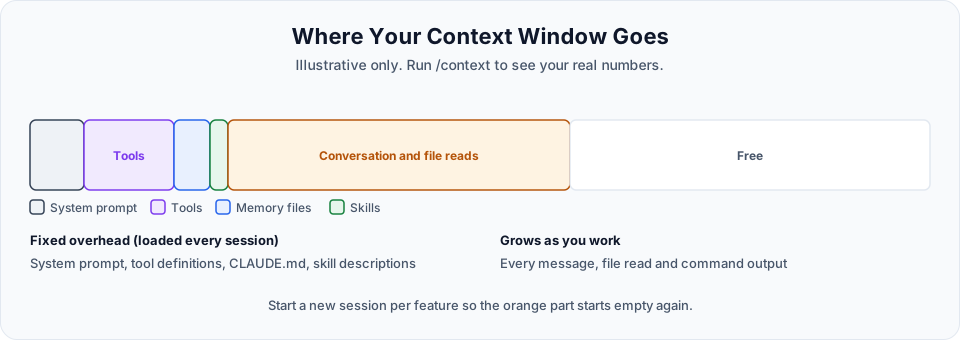
What remains is yours. Treat the context indicator like your phone's battery icon: you do not wait for the phone to die before charging it.
Auto-compaction and why you should not rely on it
When the context gets close to full, Claude Code auto-compacts: it summarises older parts of the conversation to free space. You may see a note that auto-compact is coming, then a "compacting" status.
That sounds convenient, but there are two problems:
- Large contexts cost more and perform worse. Every message re-sends the whole context. Long before you reach the limit, you are paying for it in tokens, and the model has more to sift through, which makes mistakes more likely.
- Compaction loses detail. A summary is a lossy compression. If an important decision (the backend port, a security rule, a bug you found) is dropped from the summary, Claude no longer knows it.
So stay ahead of it:
- New feature, new session. We have five branches, so we use five sessions. Name each one with
/renameso you keep a history of what happened in each. (In the video/clearis used for speed. A named session is better because you can come back to it.) - Same feature, context growing? Compact it yourself, and tell it what to keep:
/compact Keep: backend runs on port 8000, frontend on 8080, all models use snake_case, camelCase only on the wire. Open issue: PUT returns stale data.Put permanent decisions in files, not in chat
Anything that must survive across sessions belongs in CLAUDE.md or a spec file, not in the conversation. Compaction and new sessions only ever lose chat history, never your files.
Ready to build
With Sonnet selected, a clean context and our specs in place, start each feature like this:
/clear
/rename backend-setup
Session hygiene checklist
Use this at the start and end of every feature:
| When | Do this |
|---|---|
| Starting a feature | New session (or /clear), /rename <feature>, check /model |
| Before a big prompt | /context to see how much room you have |
| Midway, same feature | /compact <what to keep> if the conversation has grown large |
| Quick unrelated question | /btw <question> |
| A decision that must survive | Write it into CLAUDE.md or the spec, not only the chat |
| Feature merged | Close the session or /clear before the next one |
Official references
- Explore the context window
- How Claude Code works: when context fills up
- Manage costs effectively
- Manage sessions
Written By: Shramik Masti
How is this guide?
Last updated on
Integration Requirements and Flow
The plan for building the backend in small feature branches, the target architecture, and how the frontend, FastAPI and SQLite fit together.
Project Setup with GitHub, UV and Alembic
Commit the initial setup, configure team settings and commit attribution, then scaffold the FastAPI backend skeleton with uv and Alembic on a feature branch.