
Operators
Operators in Python
Operators in Python are special symbols or keywords used to perform operations on values and variables. They are the foundation of expressions and logic building in Python programs.
Types of Operators in Python
Python provides the following categories of operators:
- Arithmetic Operators
- Assignment Operators
- Relational Operators
- Logical Operators
- Unary Operators
1. Arithmetic Operators
Used for performing mathematical operations such as addition, subtraction, multiplication, and division.
x = 2
y = 3

print(x + y)  # 5 (Addition)
print(x - y)  # -1 (Subtraction)
print(x * y)  # 6 (Multiplication)
print(x / y)  # 0.666... (Division)
2. Assignment Operators
Used to assign values to variables.
- Basic assignment → =
- Shorthand assignment (operation + assignment together).
x = 2
x = x + 2   # Normal assignment
print(x)    # 4

# Shorthand form
x += 2
print(x)    # 6

x *= 3
print(x)    # 18

# Multiple assignments in one line
a, b = 5, 6
print(a)    # 5
print(b)    # 6
3. Unary Operators
In Python, operators can be broadly classified based on the number of operands they work with:
-
Binary Operators → Operate on two operands (e.g., a + b, x > y, p and q)
-
Unary Operators → Operate on a single operand (e.g., -a, not x)
n = 7
print(n)   # 7

print(-n)  # -7 (Negation)

n = -n     # Re-assign with negated value
print(n)   # -7
Unary operators are particularly useful for sign manipulation, logical negation, and simple transformations of values.
4. Relational (Comparison) Operators
Used to compare values. These operators always return a Boolean result (True or False).
a, b = 5, 6

print(a < b)   # True
print(a > b)   # False
print(a == b)  # False

a = 6
print(a == b)  # True
print(a < b)   # False
print(a <= b)  # True
print(a >= b)  # True
print(a != b)  # False

b = 7
print(a != b)  # True
5. Logical Operators
Logical operators are used to combine multiple conditions.
- and → Returns True only if both conditions are true.
- or → Returns True if at least one condition is true.
- not → Reverses the Boolean result.
a = 5
b = 4

print(a < 8 and b < 5)   # True  (both true)
print(a < 8 and b < 2)   # False (one false)

print(a < 8 or b < 2)    # True  (one true)

x = True
print(x)         # True
print(not x)     # False

x = not x
print(x)         # False
Truth Tables for Logical Operators
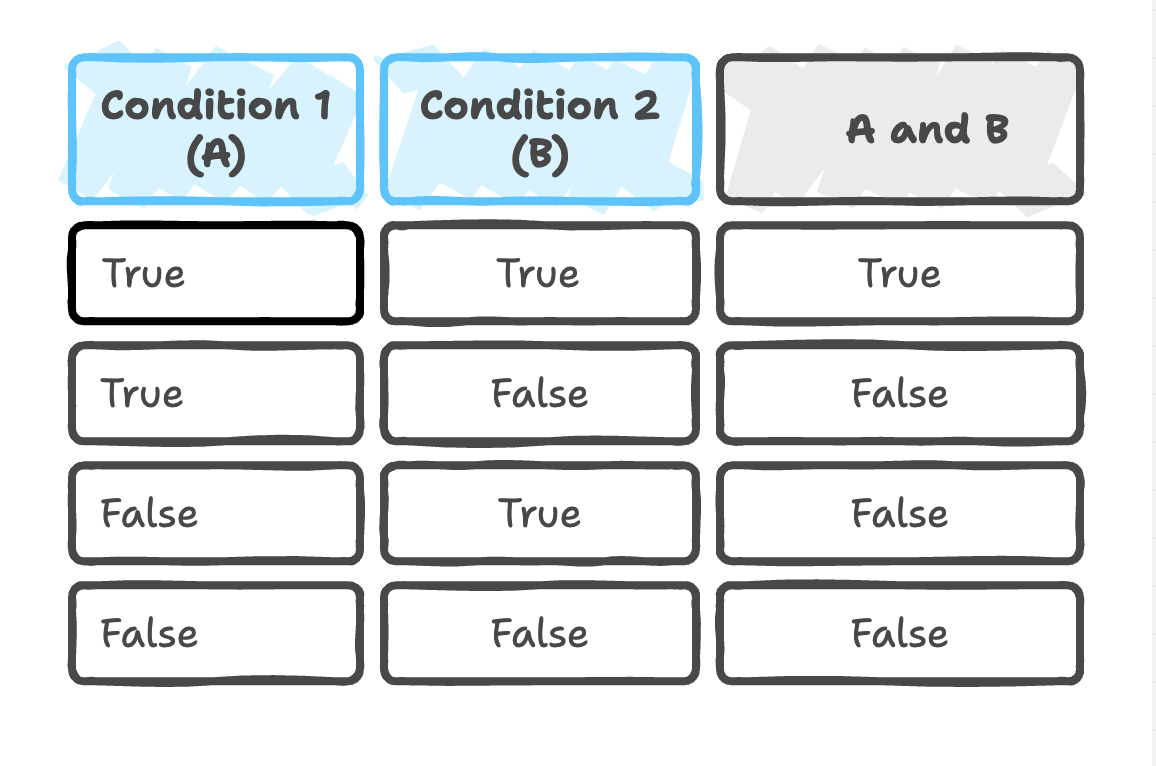
1. AND Operator (and)
The and operator returns True if both conditions are True. Otherwise, it returns False.
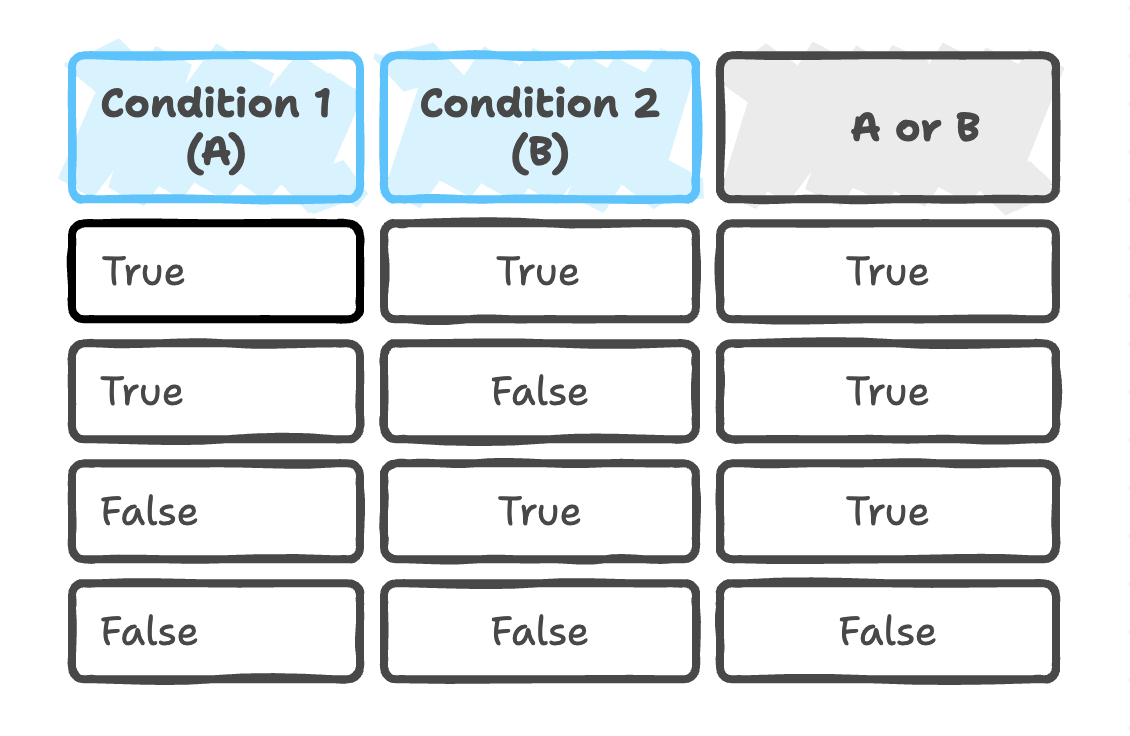
2. OR Operator (or)
The or operator returns True if any one condition is True. It returns False only when both conditions are False.
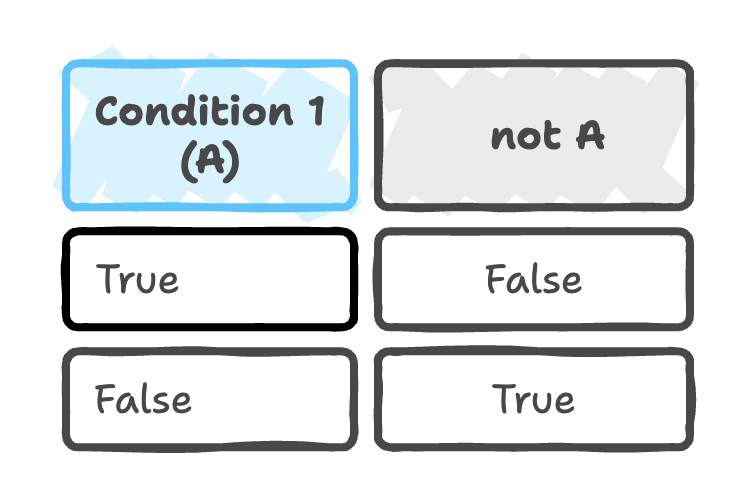
3. NOT Operator (not)
The not operator reverses the value:
- If the condition is True → returns False
- If the condition is False → returns True
Example
a = 4
b = 5

# AND operator examples
print(a < 10 and b > 1)    # True  (both conditions True)
print(a < 10 and b > 10)   # False (second condition False)

# OR operator examples
print(a < 10 or b > 1)     # True  (both True)
print(a < 10 or b > 10)    # True  (one True)
print(a > 10 or b > 10)    # False (both False)

# NOT operator example
result = True
print(result)              # True
print(not result)          # False
Summary
-
Arithmetic operators → Perform fundamental mathematical operations such as addition, subtraction, multiplication, and division.
-
Assignment operators → Assign values to variables and update them using shorthand combinations like +=, -=, etc.
-
Unary operators → Operate on a single operand to perform actions like negation or sign reversal.
-
Relational operators → Compare two values and produce Boolean results (True/False) based on the relationship.
-
Logical operators → Combine multiple conditions using and, or, and not to form complex logical expressions.
Written By: Muskan Garg
How is this guide?
Last updated on