
Tuples
Tuples are an essential built-in data structure in Python, offering a lightweight, fast, and reliable way to store ordered collections of items. They are often used when data must remain constant and protected from modification.
What is a Tuple?
A tuple is an ordered, immutable collection of elements. Once created, its elements cannot be modified, added, or removed - ensuring data safety and preventing accidental changes.
tup = (23, 45, 67, 43)
print(type(tup))       # <class 'tuple'>
Python also allows tuple creation without parentheses:
tup = 23, 45, 67, 43Both are valid and represent the same structure.
Key Characteristics of Tuples
1. Ordered: Elements retain the sequence in which they were defined.
2. Immutable: You cannot change or reassign elements.
tup[2] = 65
# TypeError: 'tuple' object does not support item assignment
3. Heterogeneous: A tuple can store mixed data types, such as integers, strings, floats, and even lists.
tupA = (2, 'navin', 7.9)4. Faster than Lists: Tuples are lighter and faster because they require less memory and have fixed sizes.
5. Supports Indexing: Elements can be accessed using indices.
tup[2] # Output: 67Tuple Methods
Tuples offer only two built-in methods because they are immutable:
1. count(): Returns how many times a value occurs.
tup = (5, 2, 5, 7)
tup.count(5)   # Output: 2
2. index(): Returns the index of the first occurrence.
tup.index(7) # Output: 3Built-in Functions with Tuples
Although tuples cannot be modified, you can still apply several built-in functions:
min(tup)      # Minimum value
max(tup)      # Maximum value
len(tup)      # Number of elements
sum(tup)      # Only if all elements are numbers
Tuple Unpacking
Python allows you to assign tuple elements to multiple variables in one line:
tupA = (2, 'Navin', 7.9)
num, name, num1 = tupA
Important: The number of variables must match the number of tuple elements:
num, name, num1, num2 = tupA
# ValueError: not enough values to unpack
Mutability Inside Tuples
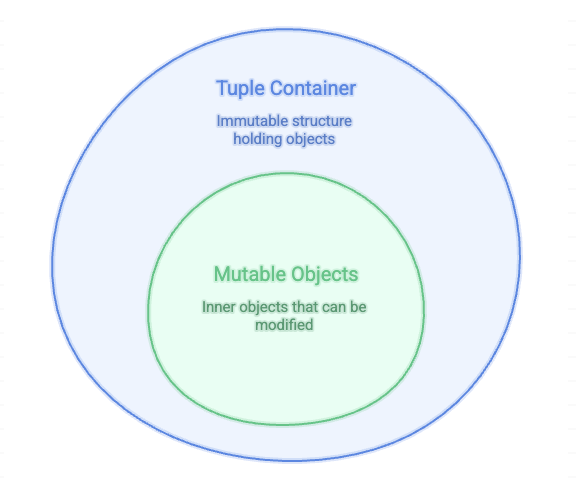
While tuples themselves are immutable, they can contain mutable objects (like lists). These nested objects can be modified:
tupB = (34, 'navin', [3, 4, 5, 6])

tupB[2][1] = 9
print(tupB)
# (34, 'navin', [3, 9, 5, 6])
The tuple structure stays fixed, but the inner list changes - showing immutability applies only to the tuple container, not its contents.
Membership Check
Use the in keyword to verify if an element exists in a tuple:
34 in tupB        # True
'Navin' in tupB   # False
Single-Element Tuple
A tuple with one element must include a trailing comma:
tup = (45)
type(tup)     # int

tup = (45,)
type(tup)     # tuple
Without the comma, Python reads it as a normal integer.
Summary
Tuples are ideal when you need an ordered, unchangeable, and high-performance data structure. They help ensure data integrity, prevent accidental modifications, and are especially useful when returning multiple values from functions or storing information that should remain constant throughout the program.
Written By: Muskan Garg
How is this guide?
Last updated on