
locate Command - Fast File Search
What Is the locate Command?
The locate command helps you find files and directories quickly by searching a pre-built database of filesystem paths.
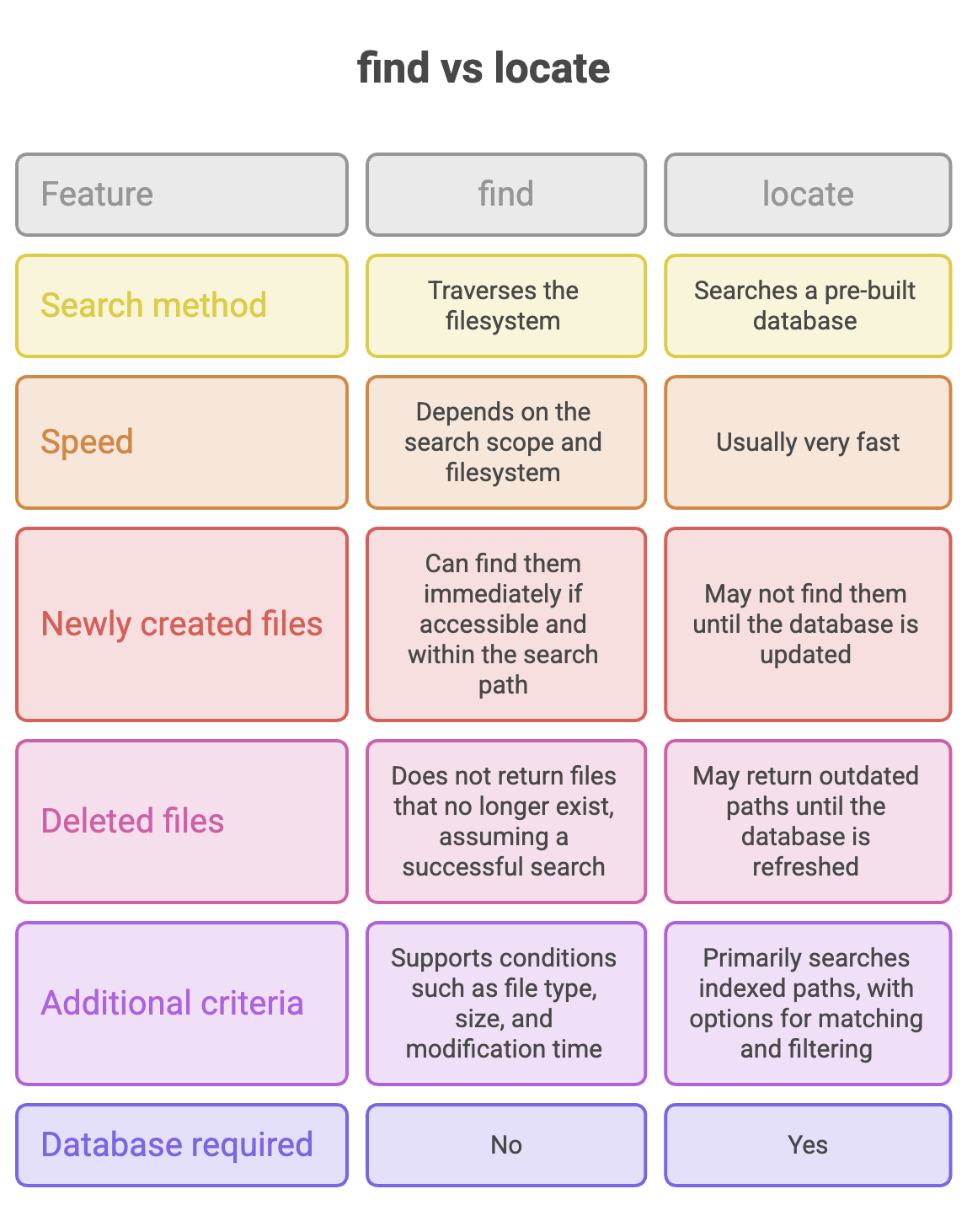
Unlike find, which searches through directories on the filesystem, locate looks up matching paths in an existing database. This makes it especially useful when you need to locate a file quickly on a system containing many files.
The main trade-off is that search results depend on how recently the database was updated.
Installation
On Ubuntu systems, locate may not be installed by default. One commonly used implementation is plocate.
Install it with:
sudo apt update
sudo apt install plocate
Verify the installation:
locate --versionBasic Syntax
locate [options] patternoptions: Optional flags that control the search.pattern: The filename or text pattern to look for in stored paths.
Common locate Commands
1. Search for a File
locate error.txtDisplays database entries whose paths match error.txt.
For example:
/home/ubuntu/error.txt
/var/log/error.txt
The results show stored paths that match the search pattern. They do not guarantee that every listed file still exists on the filesystem.
Note: locate error.txt can match paths containing that text, not only files whose exact name is error.txt.
To match a filename more precisely, use:
locate -b '\error.txt'The -b option matches the basename, and the escaped pattern treats the filename literally.
2. Count Matching Paths (-c)
Use -c to count matching database entries instead of printing each path.
locate -c telusko.txtThe output might be:
3This means three matching entries were found in the database. It does not necessarily mean that three matching files currently exist.
3. Search Without Considering Case (-i)
Use -i to ignore differences between uppercase and lowercase letters.
locate -i exception.txtThis can match paths containing names such as exception.txt, Exception.txt, or EXCEPTION.TXT.
How Does the locate Database Work?
The locate utility uses an index of filesystem paths stored in a database, commonly maintained by a tool such as updatedb.
The process works as follows:
- Database creation or update: The system scans eligible filesystem locations and records paths in the database.
- Search: When you run
locate, it searches the stored index. - Results: Matching paths are displayed without requiring a new directory-by-directory scan for every search.
This approach makes locate fast, but its results can become outdated when files are created, renamed, or deleted.
Database updates may be scheduled automatically, depending on the Linux distribution and system configuration.
Updating the Database
Suppose you create a new file:
touch exception.txtYou then search for it:
locate exception.txtIf the database has not been updated since the file was created, the file may not appear in the results.
To refresh the database, run:
sudo updatedbThen search again:
locate exception.txtThe updated database should now include the file, provided its directory is covered by the database configuration and accessible to the indexing process.
You do not need to run
updatedbafter every file creation. Use it when you need to refresh the index and the expected result is missing.
Summary
locateis a fast way to search for files and directories by path.- It searches an index rather than scanning the filesystem from scratch.
- Use
-cto count matching paths and-ifor case-insensitive searches. - Run
sudo updatedbwhen you need to refresh the database, subject to your system's configuration and permissions. - Choose
locatefor speed andfindwhen you need current filesystem results or more detailed search conditions.
Remember: locate prioritizes speed by searching an index, while find searches the filesystem directly.
Written By: Muskan Garg
How is this guide?
Last updated on