
Logical & Bitwise Operators
1. Introduction
Logical and bitwise operators are used to perform operations on:
- Boolean values (
true/false) - Integer values at the bit level (
int,long,short,byte,char)
They are widely used in:
- Conditional statements (
if,while) - Complex decision-making
- Performance-critical code
- Low-level programming (flags, masks)
- Algorithms, encryption, compression, drivers, etc.
In Java, we usually separate them into:
- Logical operators:
&&,||,! - Bitwise operators:
&,|,^,~,<<,>>,>>>
This document explains both, along with the differences between them.
2. Logical Operators (Boolean Logic)
Logical operators work with boolean expressions and return true or false.
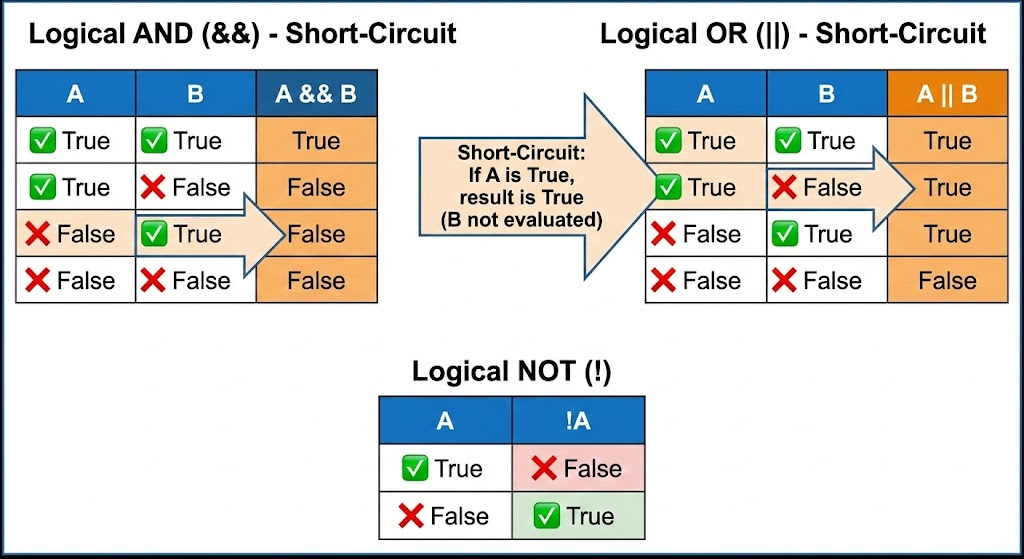
2.1 Logical AND (&&)
- Returns
trueif both operands aretrue. - Uses short-circuit evaluation:
- If the left side is
false, the right side is not evaluated.
- If the left side is
Example:
int age = 20;
boolean hasId = true;

if (age >= 18 && hasId) {
    System.out.println("Allowed to enter");
}
Truth table:
| A | B | A && B |
|---|---|---|
| true | true | true |
| true | false | false |
| false | true | false |
| false | false | false |
2.2 Logical OR (||)
-
Returns
trueif at least one operand istrue. -
Also uses short-circuit evaluation:
- If the left side is
true, the right side is not evaluated.
- If the left side is
Example:
boolean isAdmin = false;
boolean isManager = true;

if (isAdmin || isManager) {
    System.out.println("Access granted");
}
2.3 Logical NOT (!)
- Inverts a boolean value.
boolean isLoggedIn = false;
if (!isLoggedIn) {
    System.out.println("Please log in first");
}
Short-Circuit Behaviour (Important)
if (a != 0 && (b / a) > 2) {
    // Safe: second condition only runs if a != 0
}
If && did not short-circuit, b / a might cause division by zero.
3. Bitwise Operators (Working at Bit Level)
Bitwise operators work on the binary representation of integer values.
They are:
&→ Bitwise AND|→ Bitwise OR^→ Bitwise XOR~→ Bitwise NOT (complement)<<→ Left shift>>→ Right shift (signed)>>>→ Unsigned right shift
For examples, we often use 8-bit binary for simplicity.
3.1 Bitwise AND (&)
Works bit by bit:
1 & 1→1- Else →
0
Example:
int a = 5;   // 0101
int b = 3;   // 0011
int c = a & b; // 0001 -> 1
3.2 Bitwise OR (|)
1 | 0→11 | 1→10 | 0→0
Example:
int a = 5;   // 0101
int b = 3;   // 0011
int c = a | b; // 0111 -> 7
3.3 Bitwise XOR (^)
XOR (Exclusive OR):
1 ^ 1→01 ^ 0→10 ^ 1→10 ^ 0→0
Example:
int a = 5;   // 0101
int b = 3;   // 0011
int c = a ^ b; // 0110 -> 6
XOR is useful for:
- Toggling bits
- Simple encryption
- Finding odd occurrences in arrays
3.4 Bitwise NOT (~)
Flips all bits:
0→11→0
Example:
int x = 5;     // 0000 0101
int y = ~x;    // 1111 1010 (in 8 bits) -> -6 (in 2's complement)
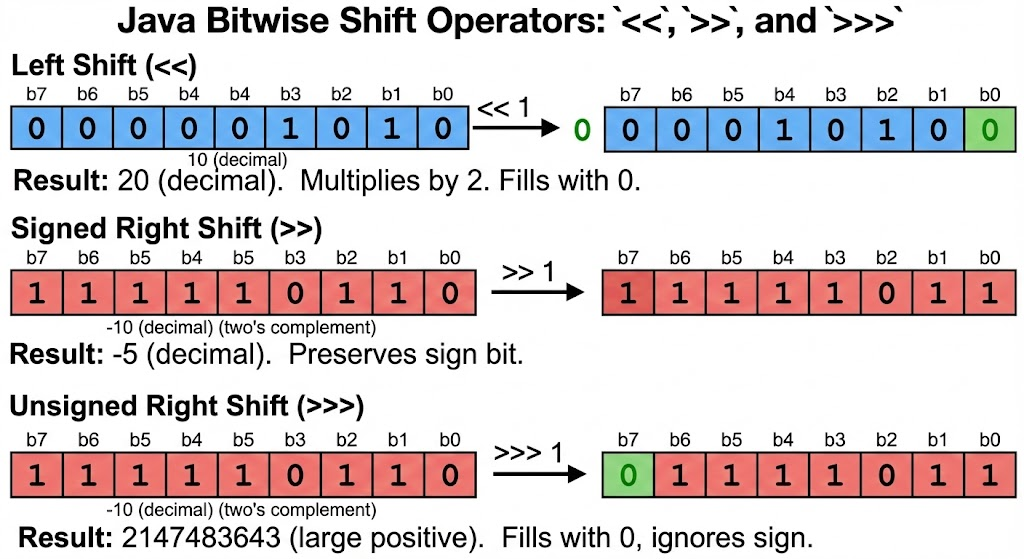
3.5 Left Shift (<<)
Shifts bits to the left, inserting zeros on the right.
Effectively multiplies by 2^n.
int x = 5;      // 0000 0101
int y = x << 1; // 0000 1010 -> 10
int z = x << 2; // 0001 0100 -> 20
3.6 Right Shift (>>)
Shifts bits to the right.
- For positive numbers: inserts zeros on the left
- For negative numbers: sign bit (1) is propagated (arithmetic shift)
int x = 16;     // 0001 0000
int y = x >> 1; // 0000 1000 -> 8
int z = x >> 2; // 0000 0100 -> 4
3.7 Unsigned Right Shift (>>>)
Shifts bits to the right, always filling zeros on the left.
- Works differently for negative numbers
- There is no
<<<operator in Java
Example:
int x = -8;
int y = x >> 1;   // keeps sign bit
int z = x >>> 1;  // fills left bits with 0
>>> is useful when treating integers as raw unsigned bit patterns.
4. Logical vs Bitwise: Important Differences
4.1 On Booleans
&&and||are logical with short-circuit.&and|can also be used with booleans as non-short-circuit logical operators.
Example:
boolean a = false;
boolean b = true;

boolean r1 = a && b; // short-circuit, b may not be evaluated
boolean r2 = a & b;  // both sides are always evaluated
&& and || are recommended for conditions.
& and | with booleans are rare, mostly used when you really need both expressions to be evaluated (side effects).
4.2 On Integers
&&,||,!→ only work with booleans&,|,^,~,<<,>>,>>>→ work with integer types
Example (invalid):
int a = 10, b = 20;
// if (a && b) {} // ERROR: cannot use && with int
5. Practical Examples
5.1 Using Bitwise AND as a Mask
int permissions = 0b0110; // Read + Write (for example)
int readMask = 0b0010;

boolean canRead = (permissions & readMask) != 0;
5.2 Check Even/Odd Using Bitwise AND
int n = 7;
if ((n & 1) == 0) {
    System.out.println("Even");
} else {
    System.out.println("Odd");
}
n & 1 checks the last bit.
5.3 Toggling a Bit Using XOR
int flags = 0b0100;  // bit 2 is set
int mask  = 0b0100;  // toggle bit 2

flags = flags ^ mask; // now flags becomes 0
6. Common Mistakes
- Confusing
&&with&, and||with|. - Expecting short-circuit behavior from
&/|when used with booleans. - Not understanding the effect of
>>vs>>>on negative numbers. - Using logical operators on integers (not allowed).
- Overcomplicating conditions using bitwise operators instead of clear logical ones.
7. Summary
- Logical operators (
&&,||,!) work with booleans and are mainly used in conditions and control flow. - Bitwise operators (
&,|,^,~,<<,>>,>>>) operate on individual bits of integer types. &&and||are short-circuit;&and|when used with booleans always evaluate both sides.- Shifts (
<<,>>,>>>) are powerful for performance and low-level operations. - Use logical operators for readability and business logic; use bitwise operators when you specifically need to work at the bit level.
How is this guide?
Last updated on